fshr
The musings of a grumpy hairless ape
Network Attached Storage
Introduction
In March 2026 I decided to set up my own home based NAS for storage of photos, documents, and other things I want to keep local copies of.
Up until then we (as a family) pretty much exclusively relied on cloud storage (via Apple iCloud) for all our data storage needs, but with the growing uncertainty in the world around safety and availability of services it made sense to start at least having a copy of our more critical data locally.
Note that this isn’t intended to be a replacment for cloud services (at least not yet) as they are still too useful and convenient in a family situation, but will supplement our usage of cloud services.
I was looking for a solution which:
- Has resilient/redundant storage (minimum RAID1/mirrored pair)
- At least 4-6TB of usable storage
- NAS class drives (as they’ll run 24x7)
- Has some level of compute capability
- To run some light to medium weight apps (e.g. photo management)
- Has “as low as possible” power requirements
- Physically fits in the space I have for it
Hardware
At the time, my home lab previously sat in our under-stairs cupboard next to the vacuum cleaner (and everything else which lives under there). This means that I didn’t have a lot of room to add in large pieces of hardware and was generally limited to smaller form factor systems. In addition, the existing pieces of hardware I had were also wall mounted (to save floor space), so any NAS hardware had to also wall mount, and has an associated limit on the physical depth available (from the wall).
Note I’ve since moved my home lab into a mini rack, so while the above is no longer the case it was at the time of doing this.
Counter to that, while small slimline mini PCs do exist (I have HomeAssistant running on an N100 mini PC), they’re typically limited to a single NVMe or 2.5" SSD for storage. As this NAS was to be a main data store for photos plus other important data I did need to consider both storage capacity and resiliency in my planning.
Additionally, (as of buying / writing) we were currently in the midst of an AI “gold rush” and the price of storage was currently super high. While I’d love to go all SSD/NVMe I can’t justify the cost of higher capacity NVMe or SSDs, and am pretty much limited to 3.5" HDDs.
Compute
The choice of 3.5" HDDs immediately ruled out mini PCs (as above), and the aforementioned location restrictions ruled out even the smaller commercial NAS solutions such as the Bee-Link ME Pro.
So what do I have…
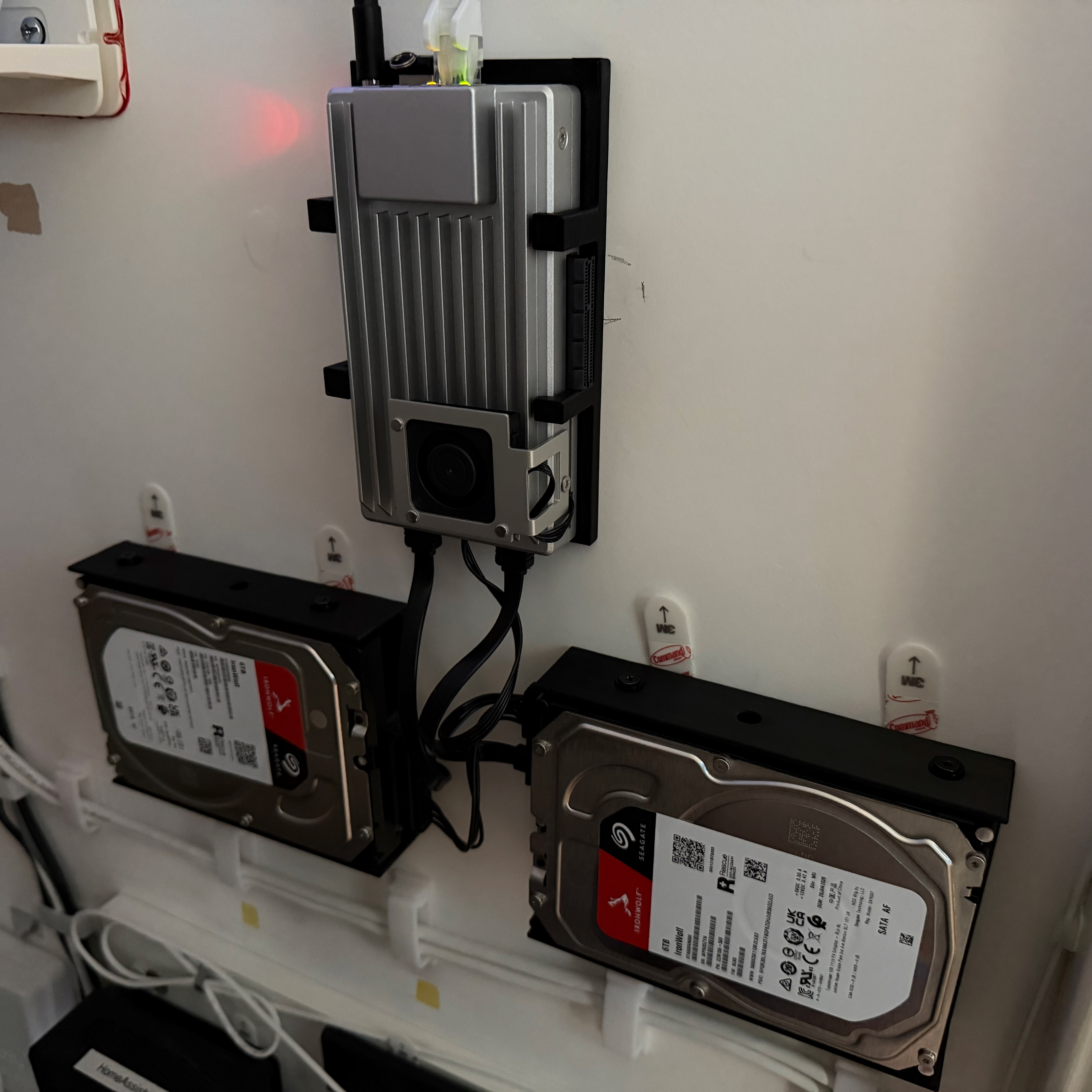
A company called IceWhale Technology makes a set of small form-factor single-board servers designed (primarily) for home lab environments. While small form-factor, they avoid the question of internal storage capacity by not having any internal storage bays at all and instead providing external SATA and power connectors for standard SATA drives, specifically connectivity for 2 “external” drives.
Specifically, the board I chose, the ZimaBoard 2 comes with:
- Intel N150 processor
- 8/16 GB RAM
- 32/64 GB eMMC internal storage
- 2 x 2.5G Ethernet ports
- 2 x USB 3.1
- 2 x SATA 3.0 interfaces (including power)
- “External” PCIe 3.0 interface
- MiniDP 1.4 interface
And comes in at a relatively small 140mm x 83mm x 31mm (about the size of 2 phones stacked on top of each other).
Storage
For storage, the HDDs of choice for home NAS usage seem to be one of:
- Seagate IronWolf (Pro)m, or
- WD Red Plus/Pro
Both are NAS spec CMR drives, which means that they’re rated for continual 24h running (standard consumer drives aren’t), and 3.5" HDDs come in a standard size of around 150mm x 100mm x 30mm, so even with some form of wall mount still come in under 50mm deep.
I’d originally planned to go with the WD Red Plus drives (as they’re slightly quieter and lower power), but persistent stock shortages meant long lead times, so ended up with the Seagate Ironwolfs (which were on good availability).
I have a pair of 6TB IronWolf drives set up as a ZFS mirror (RAID 1). This mirror will be ued for all my main storage requirements.
Software
NAS OS
The ZimaBoard ships with IceWhale’s own NAS OS ZimaOS installed. This is a reasonably lightwight NAS OS providing basic file sharing functionality along with the ability to run server applications (e.g. Jellyfin, Immich, etc.) via an App Store (based on Docker). It’s all then wrapped in a simple web GUI for administration purposes.
While waiting for the delivery of the ZimaBoard, I did try out ZimaOS in a Proxmox VM. While easy to use, I did find it lacking in a few areas (it’s aimed more at the first time NAS user), and being a relatively new entrant into the NAS market it seemed to be lacking the maturity of other NAS focussed OSs - particularly when coming at it from a power user perspective.
In parallel I also tried TrueNAS Scale in another Proxmox VM. I think I’m fair in saying that TrueNAS is the polar opposite to ZimaOS when it comes to NAS OSs. It’s very much targeted at the higher end of the market, and while there is a free community edition, it’s still very much not a beginner’s option. While this didn’t exclude it from my list, it does have a requirement for a “proper” boot drive to run from, and one limitation of the ZimaBoard is that it only has 32/64GB eMMC internally for OS which wouldn’t handle the read/write requirements of TrueNAS.
My 3rd and final option for NAS OS was to look at Unraid. One advantage Unraid has over TrueNAS is that it will quite happily run from a USB stick connected into the server (it loads into RAM on boot and runs from there), this means I don’t need to provide a dedicated boot drive just for the NAS OS.
As of writing, Unraid OS 7.3 is currently in beta. One feature 7.3 adds is the ability to boot off an internal drive like ZimaOS or TrueNAS, however like the existing USB boot it still loads into RAM and runs from there. This (hopefully) should allow me to install Unraid on the Zimaboard’s internal eMMC drive and use internal boot.
Again, I tested Unraid in a Proxmox VM and to me, Unraid sits somewhere in the middle between ZimaOS and TrueNAS. It’s more mature and feature complete than ZimaOS, but doesn’t have the steep learning curve or system requirements of TrueNAS. It has a wide variety of Apps and Plugins available, and supports both traditional disk pools (which I’m using) as well as Unraid arrays.
One downside of Unraid compared to either ZimaOS or TrueNAS is that it is a licensed product. It is a relatively cheap license at (currently) $49 for the base perpetual license (i.e. doesn’t expire) with a year of version updates, and then $36 a year after that for updates. I know that may turn some people off, but I’m taking the view that for what I’m using it for, having a product which is actually commercially viable and doesn’t rely on either people’s free time to develop it, or selling my data in any way, is actually a benefit.
So yes, ultimately I went with Unraid for the install, and it’s set up on my Zimaboard booting from a small 32GB USB stick. The two 6TB drives are set up in a ZFS mirror (RAID1), with a set of shares configured for the various applications I’m running…
Apps
In terms of Apps I’m running:
- File Services
- Basic local file shares using Unraid’s built in SMB functionality, e.g. it’s a target location for HomeAssistant backups
- [Immich)(https://immich.app)
- For local photo storage/backup
- Gitea
- Hosting local replicated copies of my Github repos
- SoundServer
- A self-developed setup using Icecast and LiquidSoap to provide a backend for local streaming of looped audio sounds to network speakers (e.g. rain sounds, ocean sounds, etc.)
© Paul Fisher 2026 / CC BY-NC-SA 4.0


 / Disclaimer